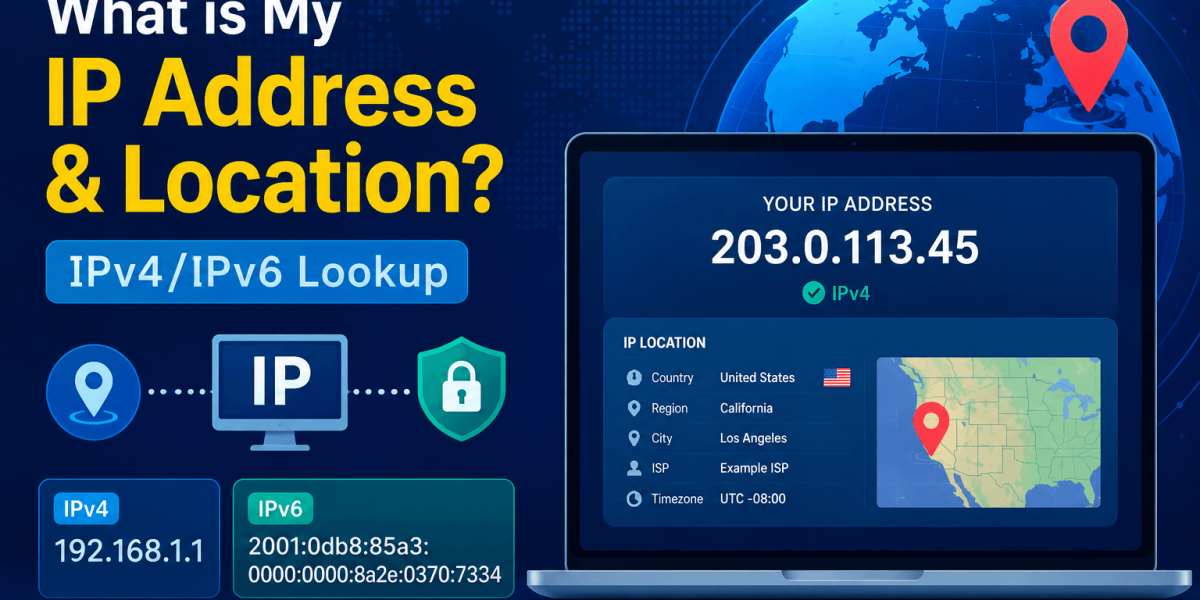
Have you ever wondered how websites know your approximate location when you visit them? Why some online services automatically show content based on your country or city? The answer is your IP address.
An IP address is given to each internet-connected device. This is the address of your device on the internet, so computers, apps and websites can talk to each other. Your IP address is utilized in the background when you send emails, stream movies, play online games and browse the web.
Many users search for “What is my IP address?” while troubleshooting network issues or testing if a VPN is working properly. An IP lookup tool can also reveal information about your approximate location, internet service provider and the type of IP address you are using. In this guide, we will explain everything about IP addresses, IPv4 & IPv6, how IP location works.
What is an IP Address
What is an IP Address?
IP stands for Internet Protocol. IP address is a unique number assigned to every device connected to the internet. It is a set of rules that serves as a way of your device identification on the internet. Just as your home has a mailing address for receiving letters, your device has an IP address that allows it to send and receive data online. Without an IP address devices would not know where to send information. When you visit a website, your IP address helps to establish the connection between your device and the website server.
Most of the internet users have a public IP address assigned by their Internet Service Provider while devices inside a home or office networks often use private IP addresses behind a router. Public IP addresses can be used to estimate location and network ownership whereas private IP addresses are mainly used for local communication inside a network.
There are two types of IP addresses: IPv4 and IPv6.
What is IPv4
What is IPv4?
IPv4 (Internet Protocol Version 4 )is the most widely used IP addressing system. It uses a 32-bit address format and consists of four sets of numbers separated by periods.
Examples:
192.168.0.1
Features of IPv4
- Easy to understand
- Supported by virtually all devices
- Uses approximately 4.3 billion unique addresses
- Most common IP version today
Important Note: Billion of devices now connect to the internet, the available IPv4 addresses are gradually being exhausted. This shortage led to the development of IPv6.
What is IPv6
What is IPv6?
IPv6 (Internet Protocol Version 6 ) is the newer version of the internet protocol. It uses a 128-bit address format, allowing for a nearly unlimited number of the uniqe addreses.
Example:
2001:0db8:85a3:0000:0000:8a2e:0370:7334
Benefits of IPv6
- Large number of available addresses
- Better network efficiency
- Improved security features
- Faster routing capabilities
- Designed for future internet growth
As more devices connect to the internet, IPv6 adoption continues to increases worldwide.
Comparison b/w IPv4 & IPv6
IPv4 vs IPv6: Comparison Table
| Feature | IPv4 | IPv6 |
|---|---|---|
| Address Length | 32-bit | 128-bit |
| Format | Numbers | Numbers and Letters |
| Example | 192.168.1.1 | 2001:db8:3333:4444:5555:6666:1.2.3.4 |
| Available Addresses | 4.3 Billion | Virtually Unlimited |
| Security | Optional | Improved Support |
| Future Scalability | Limited | Excellent |
Find IP Address
How to Find IP Address?
You can easily find out your IP address. Below are step by step instructions on how to find your private IP address on different operating systems:
Check Private IP Address on Windows 10 & 11
- Go to Start menu and click on Settings.
- Click on Network & Internet and then tap on Wi-Fi.
- Connect to a Wi-Fi network and then click on the network you are connected to.
- Now, click on Properties.
- Your IP address and DNS server address will be displayed here.
Check Private IP Address on macOS
- Open System Settings and choose Network option.
- Click on the Wi-Fi button.
- Connect to a Wi-Fi network and then select Details option.
- Your IP address will be listed here.
Find IP Address on iOS
- Open Settings and click Connections.
- Click on Wi-Fi network you are connected to.
- Click on cog symbol next to your current network.
- Your IP address will be showed here.
Benefits of Changing IP Address
Why Is Changing Your IP Address Necessary?
There are several reasons why switching IP addresses can be useful.
- Increase Your Online Privacy: Changing your IP address may make it more difficult for websites, advertisers and trackers to keep an eye on your online activities throughout sessions.
- Access Geo-Restricted Content: Some websites, streaming services and online services limit access based on your location. You might be able to access stuff that is accessible somewhere else by using a different IP address.
- Fix Network Problems: if a website or service is blocking your current IP address. Changing to new one could restore access.
- Avoid IP-based Restrictions: A number of sites temporarily ban IP addresses in response to suspicious activity or an excessive number of login attempts. You can reconnect with the aid of a new IP.
- Boost the Security of Public Wi-Fi: Accessing from public hotspots may be made more secure by using a VPN and a new IP address.
- Resolve Connection Issues: If your internet connection is not stable or some services aren’t loading properly then you can try changing your IP address.
Hide IP Address
How to Hide IP Address?
There are two different tools that will help you to change your IP address: Web Proxy and VPN.
Web Proxy
A Web Proxy is an online service that acts as an intermediator between your device and websites that you visit. When you use a proxy then your internet requests are first sent to the proxy server and then forwarded to the destination websites.
Web proxies are typically set up on an application-by-application basis. When connected to a proxy server, your real IP address is hidden and replaced with the proxy server IP address. As a result the websites you visit only see the proxy’s IP address.
Virtual Private Network
A VPN provides a more secure way to hide your IP address. Unlike a web proxy, a VPN can be directly installed on your device and protect all internet traffic.
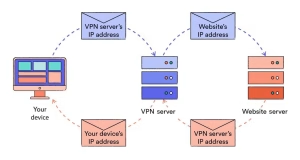
A VPN routes your internet connection through a remote server which assigns you a different IP address. This makes it appear as though your online activity is coming from the VPN server rather than your actual location.
IP Address Lookup
What is an IP Address Lookup?
An IP lookup is a process that identifies associated with an IP address. It serves as a resource that correlates an IP address with specific information including its geographical location, Internet Service Provider and related domain.
When you use an IP lookup tool, it may display:
- IP Address
- IPv4 or IPv6 status
- Country
- Region
- City
- ISP
- Organization
- Time Zone
- Brower information
This information helps users understand how they appear online.
Common IP Address Lookup Uses
Users use IP lookup tools for:
- Checking VPN connections
- Identifying ISP information
- Troubleshooting networks
- Detecting suspicious activity
- Remote access configuration
- Website administration
Working Process of IP Geolocation
How Does IP Geolocation Work?
IP geolocation estimates your location based in database maintained by internet providers and geolocation services.
The process generally works like this:
- Your device connects to the internet.
- Your ISP assigns an IP address.
- Geolocation database associate that IP with a specific region.
- Websites use that information to estimate your location.
Conclusion
Concluding Words
An integral component of the internet’s operation is your IP address. It makes it possible for websites to distribute content, gadgets to communicate, and online services to run smoothly. You may easily find out your IP address, approximate location, ISP information, and whether you are connected via IPv4 or IPv6 by utilizing an IP lookup address.
FAQs
Common Questions and Answers
Q 1. Can an IP address reveal my exact location?
No, an IP address usually reveals only an approximate location such as country, region or city.
Q 2. Can someone track me through my IP address?
Yes, your IP address can show certain information about you but it cannot directly expose your exact location or identity. When someone track your IP address they may be able to see your details such as your country, state, city, ISP and time zone.
Q 3. What is the difference between IPv4 and IPv6?
IPv4 uses a 32-bit address system while IPv6 uses a 128 bit system with significantly more available addresses.
Q 4. Why does my IP address change?
Many internet providers assign dynamic IP addresses that may change when you reconnect to the internet or restart your router.
Q 5. Is it possible to identify an individual via IP lookup?
No, a person cannot be directly identified by an IP lookup. It can only offer broad information related to an IP address.